
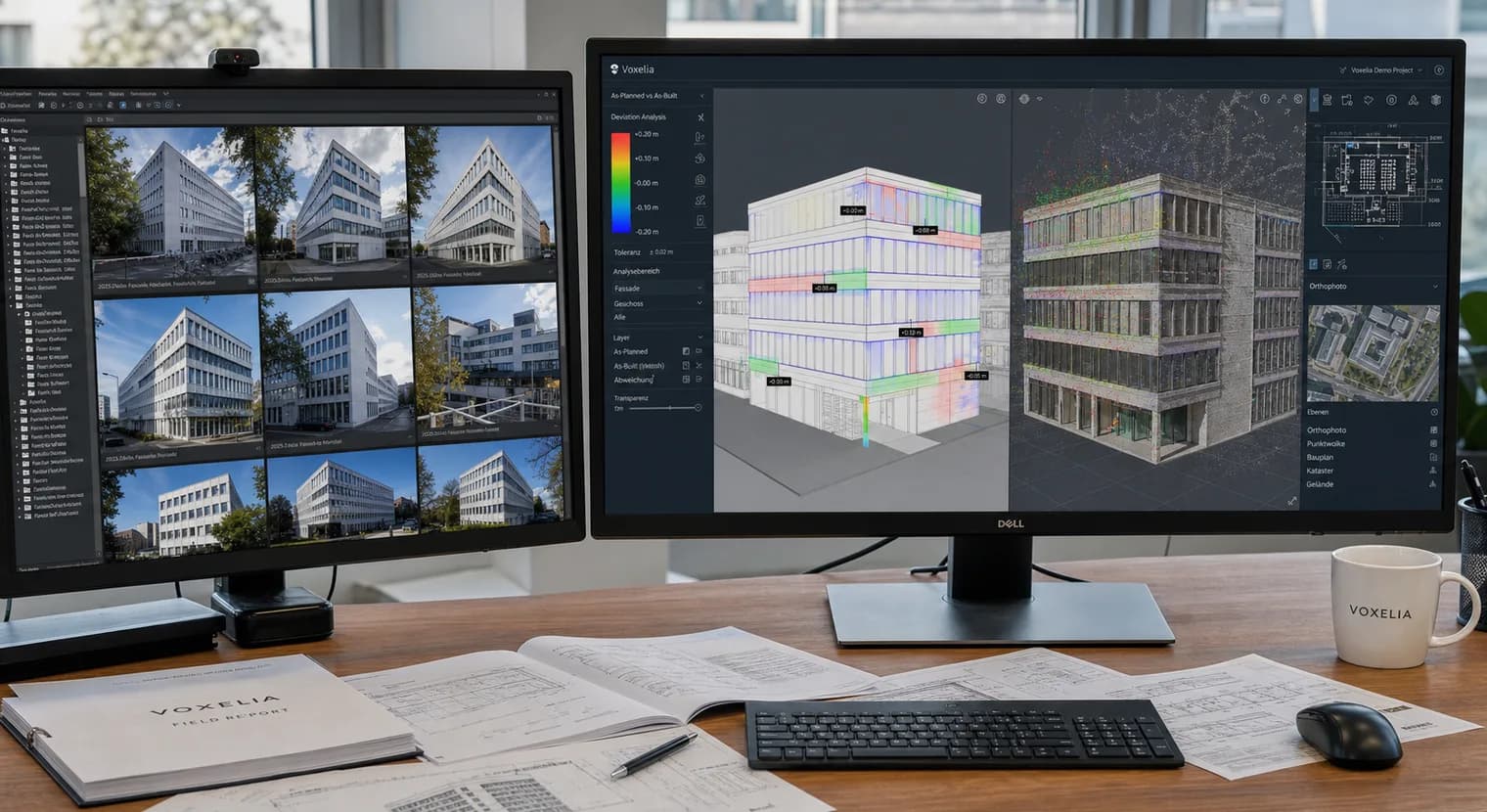
What as-built vs as-planned means in an image-data workflow
As-built describes the captured or actual condition. As-planned describes the intended condition from CAD, BIM, execution drawings, PV layouts, refurbishment plans or installation documents. The comparison identifies where those two views align and where they diverge.
For Voxelia, this comparison does not start with selling a new drone flight. It starts with processing supplied image data. Roof images, facade photos, site images, detail shots or supplied drone imagery are converted into technical planning data: 3D model, orthophoto, point cloud, CAD derivation, viewer or BIM-oriented reference.
The value appears when deviations are not just visible but usable in the right handoff format. A planner needs different notes than a roofer, solar team, scaffold planner, crane planner or BIM coordinator. The comparison must therefore fit the downstream workflow.
Practical boundary
This guide is not about booking drone flights. The relevant service is turning existing imagery into reviewable planning data.
Required data for a reliable comparison
An as-built/as-planned comparison is only as useful as its input data. On the as-built side, sharp and traceable images with enough visibility of the relevant elements matter. On the as-planned side, drawings, CAD files, IFC models, grids, reference dimensions or project coordinates describe the intended state.
Not every project needs the same depth. For PV replanning, a roof model with obstacles, pitch, edge zones and orthophoto may be enough. For architecture or refurbishment, facade references, openings, planes, defects, point clouds or IFC-oriented element references may matter more. For progress and quality review, deviations must be clearly marked and handable to responsible teams.
Clarify before processing
Defining purpose, plan state, references and output format upfront prevents a good-looking but impractical 3D export.
Comparison layers in a project
The comparison should not be reduced to a single file. In practice, visual review, geometric comparison and structured handoff support each other. The matrix below shows common review layers without generic accuracy promises.
| Check requirement | Why it matters | Handoff impact |
|---|---|---|
| Image against plan | Fast visual review of whether elements, obstacles, openings, utilities or roof areas match the plan. | Marked images, viewer pins, short review notes or PDF extracts for coordination. |
| 3D model against CAD/BIM | Spatial deviations are easier to understand when actual geometry and design state are viewed together. | 3D viewer, GLB/OBJ, point cloud, CAD overlay or IFC-oriented reference with documented model limits. |
| Orthophoto against 2D plan | Roof, facade or ground surfaces can be used as rectified references in CAD/GIS workflows. | GeoTIFF, orthophoto, DXF/DWG derivation or layer structure with reviewable contours. |
| Issue against responsibility | A deviation is actionable only when status, location, description and next step are clear. | BCF issue, viewer comment, CAD layer or task list for planning, execution and site management. |
| Model limit against decision | Hidden or uncertain areas must not silently become confirmed as-built data. | Uncertain areas, hidden elements and recommended on-site checks are explicitly documented. |
Workflow from supplied images to review package
A useful comparison follows a clear sequence. First, the supported decision is defined. Then image data and plan state are checked, prepared into a shared reference and delivered as a compact review package.
- 01
Define purpose and plan state
Clarify whether the comparison supports PV, refurbishment, architecture, facade measurement, scaffolding, crane planning or BIM coordination.
- 02
Sort imagery and references
Original images, metadata, reference dimensions, drawings, CAD files or IFC models are checked for usability and visible gaps.
- 03
Reconstruct actual condition
Depending on the purpose, the images become a 3D model, orthophoto, point cloud, textured mesh or CAD-oriented as-built base.
- 04
Make actual and planned data comparable
Plan state and as-built data are aligned through scale, orientation, coordinates, grids or local references so specialist teams can review them.
- 05
Hand off deviations
Relevant points are documented as viewer markers, CAD layers, PDF notes, BCF issues or a short review report.
Voxelia focus
Planned and actual conditions become comparable through the right handoff
For architecture, PV, refurbishment and construction coordination, supplied imagery and design states are prepared so teams can review and process deviations.
Handoff to CAD, BIM, viewer and planning teams
The handoff determines whether the comparison is usable in daily work. CAD teams need units, origin, layers and readable contours. BIM teams need traceable model context, clear information states and, where useful, coordinatable issues. Execution teams need clear deviation markers with context, not a flood of raw files.
IFC is maintained by buildingSMART as an open standard for BIM data exchange. BCF is relevant for model-based coordination points because comments and issues can be managed separately from the model itself. GeoTIFF is useful for georeferenced raster data when orthophotos continue into GIS or CAD environments. These standards help, but they do not replace project-specific review of the actual data package.
Package instead of one file
Often the strongest delivery combines a 3D viewer, orthophoto, CAD layer, marked deviations and a short note on limits.
Document limits and responsibility clearly
Image data can make visible surfaces, edges, roof areas, facades and site states very clear. It does not automatically replace every survey, opening-up inspection or structural assessment. Hidden, reflective, too dark or weakly captured areas must remain visible as limitations.
That transparency matters for clients. A comparison should prepare decisions, not create false certainty. Voxelia therefore separates visible as-built reference, modelled interpretation, planning-ready CAD/BIM basis and points that should be checked on site or by specialist planners.
No silent assumptions
If an element is not reliably visible in the images, it should not be handed off as a confirmed deviation.
FAQ on as-built vs as-planned comparison
Related
From reading to a real project
Test the first image set for free.
The account activates one free first project. Upload the dataset from the dashboard afterward; the €45 pilot stays ready for real follow-up orders.
Free scope
Bildset
1 first project free, then handoff from €45
Keep this ready
Keep the prepared €45 pilot by email
We keep package, scope, and article context. If you do not pay now, the prepared Stripe link can come back later.
Compare planning and actual conditions from imagery
Upload existing roof, facade or site images. Voxelia creates a reviewable data package for CAD, BIM, orthophoto or 3D viewer workflows.
Article Tags
Primary sources & further reading