
What is an Orthophoto?
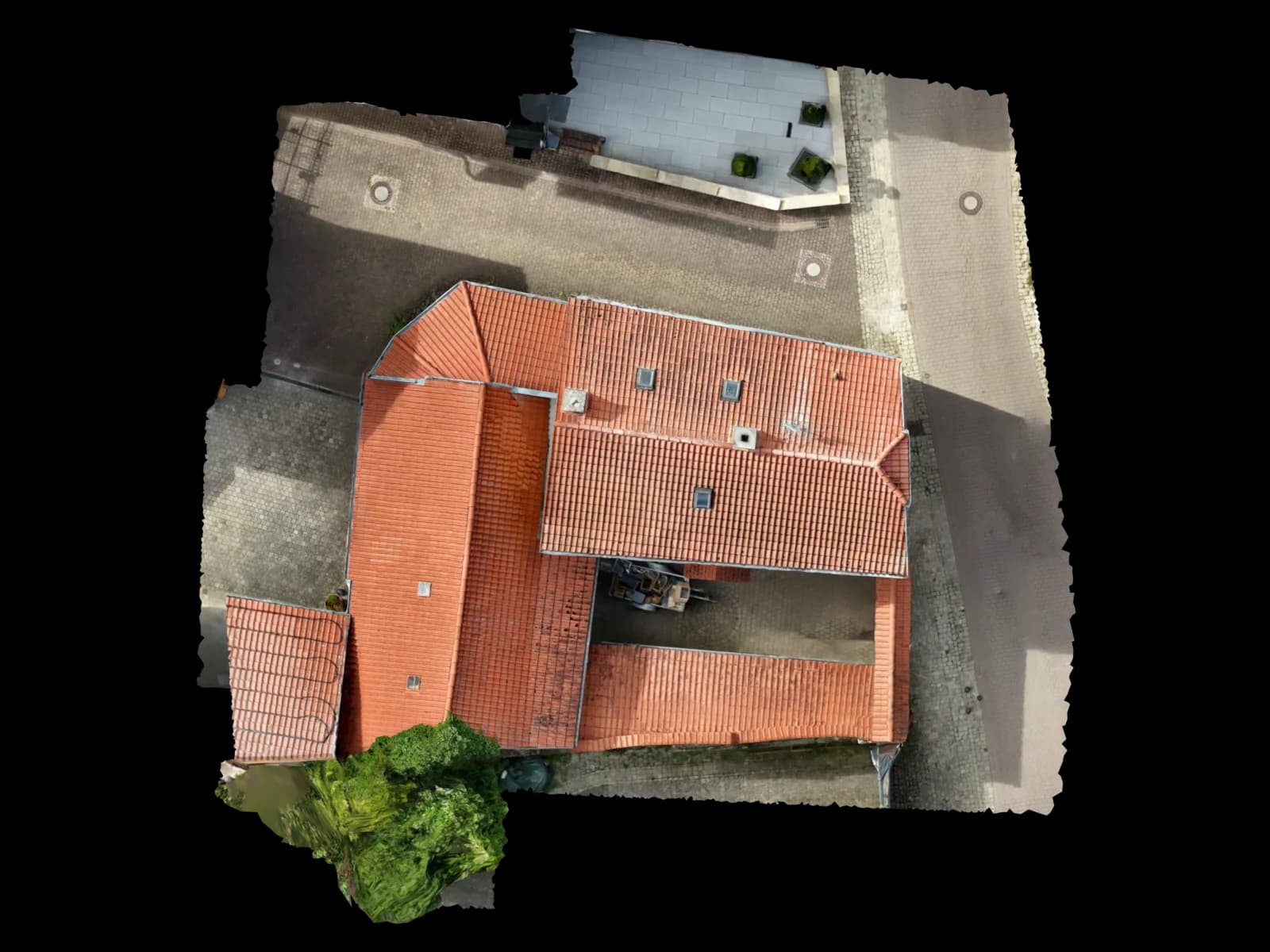
An orthophoto is a corrected and scale-accurate aerial image in which perspective distortions have been removed. Unlike normal drone photos, which have perspective errors, an orthophoto represents the ground as if viewed straight down — 1:1 scale, without distortion.
When multiple orthophotos are seamlessly stitched together, an orthomosaic is created — a large-scale aerial image used for planning, analysis, and documentation. Orthophotos are georeferenced, meaning they have real coordinates and can be used directly with GIS software or CAD programs.
How is an Orthophoto Created?
The workflow is straightforward: 1. Flight planning with overlap requirements (80% longitudinal, 70% lateral overlap). 2. Drone flight with RTK-GNSS for accuracy. 3. Image processing: Agisoft Metashape or Pix4D aligns all images and creates a 3D model. 4. Orthoprojection: The 3D model is orthogonally projected onto a plane. 5. Georeferencing with real coordinates. 6. Export as GeoTIFF or COG (Cloud-Optimized GeoTIFF) for GIS software.
Quality depends on GSD (Ground Sampling Distance), overlap, and lighting conditions. With modern RTK equipment, 1-3 cm GSD can be achieved — precise enough for technical planning.
Technical Requirements
Drone with RTK-GNSS: DJI Mavic 3E RTK, Phantom 4 RTK, or similar. GSD-targeted: Choose flight height based on GSD requirement (e.g., 15 m for 1 cm GSD with 20 MP camera). Good weather: Cloudy OK, but avoid heavy clouds and wind. Overlap: Min. 80% longitudinal, 70% lateral for seamless mosaics. Calibrated camera: Camera interior orientation must be known for accurate orthoprojection.
GSD & Resolution: Choosing the Right Flight Height
GSD (Ground Sampling Distance) is the distance between two adjacent pixels on the ground, measured in centimeters or meters. Example: 1 cm GSD means 1 pixel on the aerial image represents 1 cm × 1 cm on the ground.
Formula: GSD (cm) = (Focal length (mm) × Flight height (m)) / (Sensor width (mm) × Image width (pixels)). For most applications, 1-3 cm GSD is ideal. For solar projects at least 2 cm, for agriculture 5-10 cm sufficient. A 1 cm GSD orthophoto of a 50 ha area is about 50-200 MB (uncompressed).
Orthophoto Applications
Agriculture: Field coverage assessment, pest detection, yield estimation, field boundary digitization. Solar: Roof area capture for system planning, shadow analysis, construction progress documentation. Construction: Site surveying, volume calculation, progress monitoring. Urban Planning: Land use planning, green space management, infrastructure cadastre. Forestry: Forest status mapping, damage inventory after storms.
Georeferencing: Real Coordinates
An orthophoto without georeferencing is just an aerial image. With georeferencing, it gets real coordinates in a national or international coordinate system (e.g., UTM, Gauß-Krüger for Germany). This enables direct use in GIS software (QGIS, ArcGIS) and CAD programs.
RTK drones capture coordinates directly during flight, simplifying georeferencing. Alternatively, Ground Control Points (GCPs) — marked points on the ground with known coordinates — can be surveyed. Voxelia automatically georefereces all orthophotos in the German Gauß-Krüger system or another system of your choice.
Voxelia Orthophoto Service
Voxelia creates georeferenced orthophotos in 24-48 hours after image receipt. All orthophotos delivered in multiple formats: GeoTIFF, COG (Cloud-Optimized GeoTIFF), and optionally Shapefile with boundary polygon. GSD: 1-3 cm with RTK drone. Accuracy: ±2 cm horizontal, ±3-5 cm vertical. Cost-effective: Orthophotos from 45€ per project.