
The difference: orthomosaic, orthophoto and true orthophoto
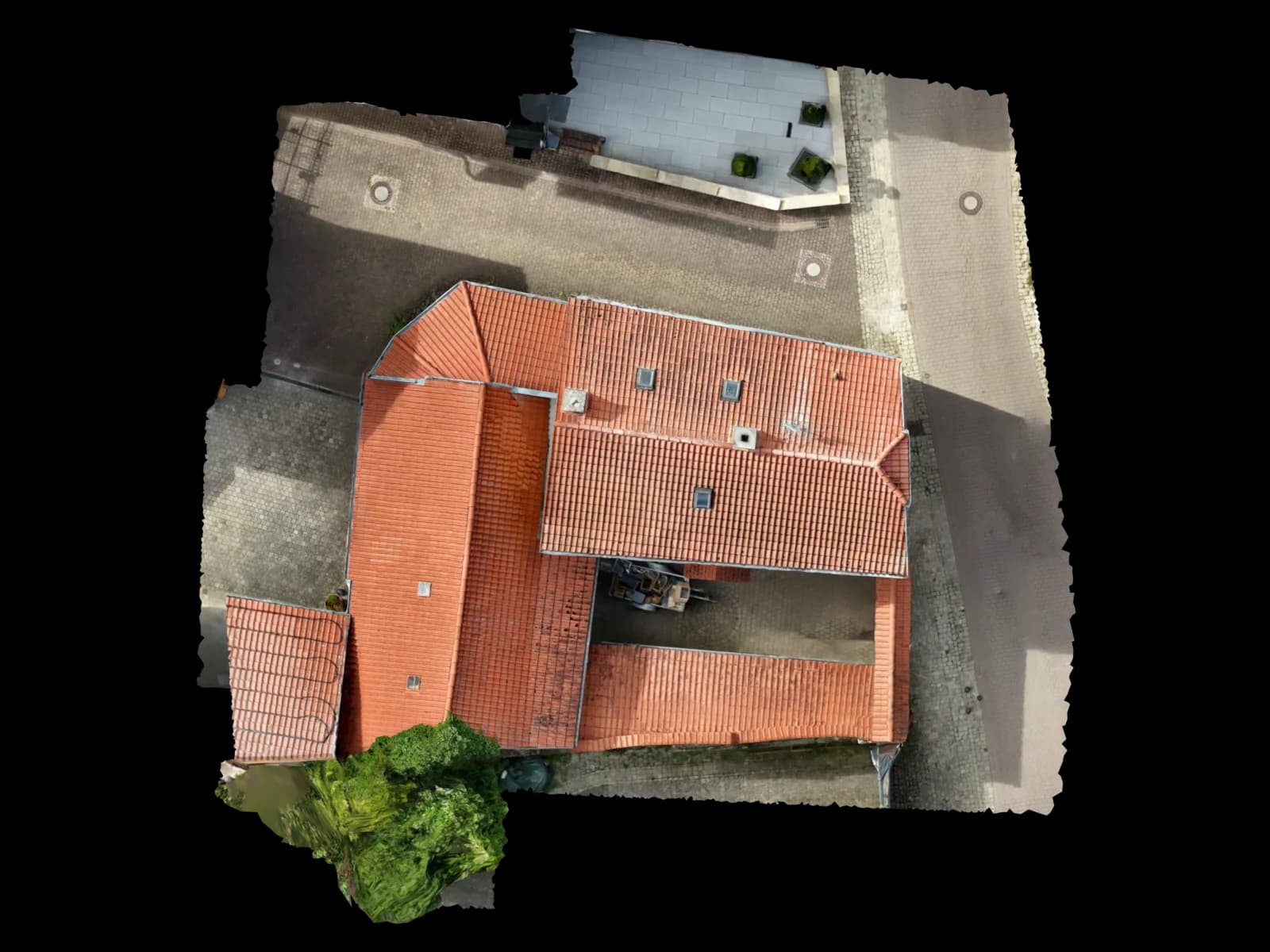
An orthomosaic is a stitched and rectified image from many overlapping photos. An orthophoto goes further: USGS defines orthoimagery as imagery where terrain relief and camera tilt displacement have been removed, combining photographic content with map-like geometry.
A true orthophoto is stricter for built environments. It addresses building lean and vertical object displacement more explicitly, so roof edges, parapets, obstructions and facade transitions sit closer to their planimetric position.
For Voxelia this matters because the service is not drone flying. The key question is whether supplied imagery is enough for a visual base or whether it can become CAD, [DXF/DWG](/ratgeber/cad-exportformate-dxf-dwg-las), BIM, PV, orthophoto or 3D viewer data.
Why measurement quality does not automatically come from good-looking imagery
[Photogrammetry](/ratgeber/photogrammetrie-leitfaden-2026) reconstructs camera poses and scene geometry from overlapping images. When a raster output is created, the software has to decide which surface the imagery is projected onto. Pix4D distinguishes between digital surface models, which contain visible surfaces such as buildings and vegetation, and digital terrain models, which represent the ground surface.
For building workflows this is central. A DTM may suit terrain questions but removes the very objects needed for roofs, facades and PV. A DSM preserves visible surfaces but can still create difficult transitions at steep edges, eaves and occluded areas.
[OGC GeoTIFF 1.1](/ratgeber/geotiff-orthofoto-cad-gis) matters because it standardizes georeferenced raster exchange. The format does not make the result precise by itself; it carries spatial metadata while the quality is created earlier in the imagery, reconstruction, rectification and review.
| System / dataset | Suitability | Best for | Practical note |
|---|---|---|---|
| Orthomosaic | Good for overview and many area questions | Sites, roof overview, construction documentation, simple markups | Often sufficient, but not automatically CAD-safe around high edges, facades or hidden roof zones. |
| Orthophoto / GeoTIFF | Good for GIS and CAD bases with proper georeferencing | Site plans, area context, CAD tracing, documentation | USGS describes orthophotos as map-like and directly measurable, but building edge quality still needs review. |
| True orthophoto | Better for built scenes with height displacement | Roof edges, urban sites, PV planning, stronger planimetry | Useful against building lean, but it needs solid 3D geometry, useful viewing angles and edge checks. |
| Facade orthoplane | Strong for planar or segmented facade areas | Damage mapping, measurement, CAD lines, renovation planning | Not a replacement for a full 3D model, but excellent when a defined facade plane must be evaluated. |
Which output is enough?
For communication, an orthomosaic is often enough. For CAD, PV layouts, roof measurement or BIM deliverables, scale, reference system, edge placement and height interpretation have to work together.
A true orthophoto is especially useful when vertical objects affect planimetric position: parapets, dormers, roof obstructions, neighboring buildings, chimneys, rails or facade steps.
Still, a true orthophoto is a 2D deliverable. If slope, height, modeled edges, BIM objects or shading geometry are required, the 3D model remains the working base and the orthophoto becomes a readable derivative.
Roof, facade and site plan: practical decisions
For PV planning, an orthomosaic may visualize module fields. Reliable planning usually needs [roof pitch, orientation](/ratgeber/dachneigung-ausrichtung-drohne), obstructions, setbacks and edge geometry from a reviewed 3D roof model.
For facades, aerial imagery is often the wrong base because the relevant plane is vertical. A facade orthoplane from suitable images can support CAD tracing, damage mapping and renovation planning.
For site plans, the question is whether objects are actually visible from above and geometrically unambiguous. For hidden eaves, overhangs or covered components, additional modeling or existing plans are needed.
| Risk scenario | Why it matters | Typical symptom | Countermeasure |
|---|---|---|---|
| Building lean in the orthomosaic | Tall objects are stitched from oblique image parts and do not sit cleanly in top view | Roof edges, facade edges or chimneys appear shifted | Review true-orthophoto workflow or derive edges directly from 3D geometry |
| DTM used for building questions | A DTM removes building and vegetation information that may be needed | Planning-relevant objects are missing or smoothed out | Assess DSM, point cloud, mesh and modeled edges separately |
| Visible area treated as measurable area | Texture may look plausible although occluded areas are interpolated | Clean visual result but implausible CAD tracing | Use checkpoints, references and model review before vectorization |
| Wrong output for PV software | PV planning often needs 3D geometry, not only a raster base | Layout looks good but height and shading remain uncertain | Combine 3D roof model, obstructions and CAD/viewer exports |
Failure modes that become expensive in CAD, BIM and PV
The common mistake is false confidence: the orthomosaic is sharp, color-stable and georeferenced, so it is treated as a CAD base. In practice, edges, height breaks and facade transitions are the critical parts.
Another risk is mixing visualization and planning. For a viewer, texture can be enough. For DXF/DWG, line position matters. For BIM, components need a reliable reference. For PV, pitch, obstructions and shading geometry matter.
Voxelia therefore reviews imagery by target output. A dataset can be good for a photoreal model, acceptable for a true orthophoto and only limited for CAD-grade roof modeling.
How Voxelia reviews supplied imagery before delivery
Voxelia starts with the desired result: CAD base, orthophoto, 3D roof model, BIM-oriented point cloud, viewer or PV planning data. Then the supplied imagery is assessed against that job.
Clarify the target output
We separate visual imagery, measurable orthophoto, true orthophoto, orthoplane, point cloud, mesh and CAD/BIM deliverable.
Check image geometry and overlap
Viewing angles, sharpness, EXIF/XMP, overlap, height differences and critical edges are reviewed technically.
Reconstruct the 3D basis
Point cloud, mesh, DSM or modeled geometry form the basis before orthophoto, true orthophoto or CAD output is derived.
Review edges and references
Reference dimensions, control points, roof edges and facade axes show whether the result is planning-ready.
Deliver the right export
Depending on workflow, outputs may include GeoTIFF, DXF, DWG, PDF, point cloud, mesh, GLB, viewer link or BIM-oriented files.
Useful deliverables: think GeoTIFF, CAD, BIM and viewer together
GeoTIFF is strong when raster data must be used spatially in GIS, CAD or planning tools. OGC defines GeoTIFF as a standardized way to exchange georeferenced or geocoded imagery.
For CAD, a raster is rarely enough. Lines, roof edges, component outlines, elevation points and areas must be vectorized or derived from the 3D model. That is where Voxelia turns imagery into usable planning data.
For BIM and digital twins, the strongest workflow often combines point cloud or mesh, orthophoto or orthoplane, CAD/DXF/DWG and a viewer for coordination.