
Why 3D Tiles matter for photogrammetry digital twins
Many photogrammetry projects do not end with a model; they end with a delivery. Solar teams need to review roof geometry, architects need existing conditions in context, contractors need client approvals and BIM teams need geometry that fits their planning workflow. A single huge OBJ, FBX or point cloud file is often the wrong delivery shape.
OGC describes 3D Tiles as a community standard for streaming and rendering massive 3D geospatial content such as photogrammetry, 3D buildings, BIM/CAD and point clouds. The value is delivery: a viewer loads the tiles and levels of detail needed for the current view.
That fits Voxelia’s role. The service is not selling drone flights; it is assessing and processing supplied imagery into usable models, CAD/BIM data, orthophotos or viewer deliverables.
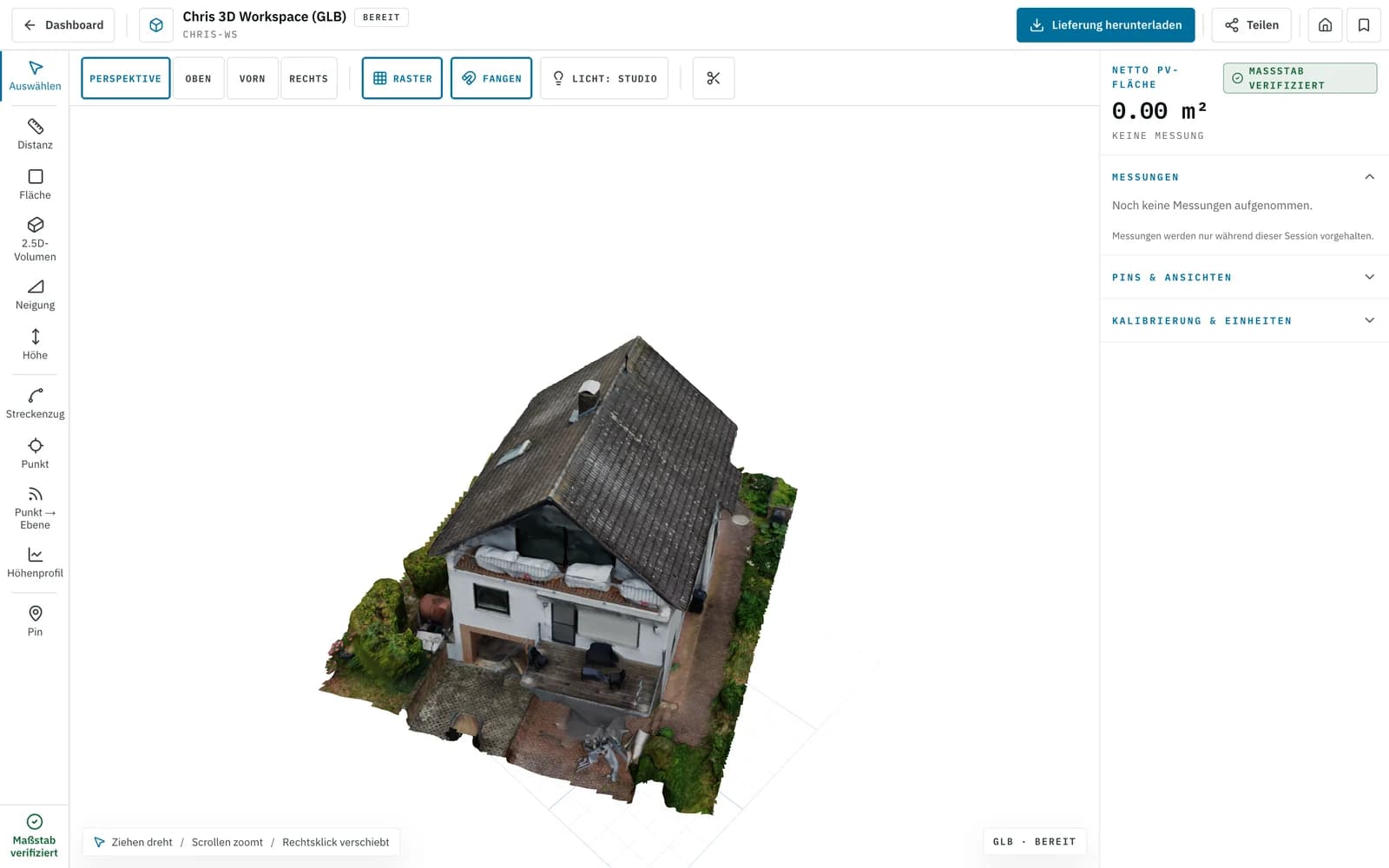
What OGC 3D Tiles provide technically
3D Tiles organize 3D content in a spatial hierarchy. Instead of loading a full scene at once, a tileset describes which tiles, levels of detail and contents matter for the current view. This is well suited to buildings, sites, facades, roofs and large existing-condition models.
The OGC publication explicitly lists photogrammetry, BIM/CAD, point clouds and 3D buildings as target content. Cesium also documents tiling photogrammetry or LiDAR-derived meshes into 3D Tiles so they can be shared on the web without simplifying them into one small file.
glTF and GLB remain important. Khronos describes glTF as a compact, runtime-efficient 3D asset format, while Cesium notes that 3D Tiles build on glTF and other 3D data types. Practically, GLB is excellent for individual optimized models; 3D Tiles are better for large, geospatial, streamed scenes.
3D Tiles, GLB, point cloud, CAD and BIM: which output fits?
A common mistake is treating every 3D output as interchangeable. Planning and approval workflows need different properties: streaming, georeferencing, measurability, file size, semantic structure and editability.
3D Tiles are not a CAD or BIM replacement. They are a delivery and viewer format for large 3D scenes. Technical work may still require DXF, DWG, IFC-oriented models, point clouds or orthophotos. The best delivery often combines several outputs.
| System / dataset | Suitability | Best for | Practical note |
|---|---|---|---|
| 3D Tiles | Excellent for large viewer scenes | Digital twins, browser viewers, georeferenced existing-condition models, client review | Useful when models are too large for comfortable single-file delivery or need spatial streaming. |
| GLB / glTF | Excellent for single optimized models | Web previews, small building or roof models, compact deliveries | Khronos positions glTF as runtime-efficient; very large scenes lack the tileset hierarchy. |
| Point cloud | Good for checking and model derivation | BIM checks, existing-condition review, geometry QA | A strong control basis, but not automatically a client-friendly browser delivery. |
| DXF / DWG | Excellent for 2D/3D planning | CAD tracing, roof edges, facade lines, PV layout, execution planning | Editable and planning-oriented, but not primarily built for photoreal streaming. |
| IFC / BIM model | Excellent for structured building data | openBIM, scan-to-BIM, element deliverables | Semantics and element structure matter; photogrammetry often supplies the geometric basis. |
Which imagery is suitable for a 3D Tiles delivery
3D Tiles do not repair weak source data. If the photogrammetry geometry is unstable, roof edges, facade planes or equipment remain unreliable in the viewer. A good workflow starts with image quality, overlap, camera calibration, metadata and target accuracy.
For web-ready models it also matters how much detail is actually needed. A digital twin for visual review can be optimized differently than a delivery for CAD tracing, BIM checks or PV planning. The more decisions depend on the viewer, the more important scale, coordinate reference and documented limits become.
Cesium lists OBJ, FBX, DAE, glTF and GLB among supported inputs for photogrammetry tiling, and notes that models should use local coordinates with meters as units. The critical part is therefore not just tiling, but preparing a consistent model first.
Workflow: from supplied imagery to a web-ready digital twin
The strongest process separates image assessment, model QA, optimization and viewer delivery so each output has a clear purpose.
Review dataset and target output
Voxelia first checks whether supplied photos, drone images or ground images are sufficient for the requested viewer, CAD, BIM, orthophoto or PV roof model.
Build and review the photogrammetry model
Camera poses, point cloud, mesh and texture are generated, then weak overlap, blur, difficult surfaces and unstable areas are identified.
Optimize geometry for the use case
Viewer navigation, CAD edges and BIM structure need different priorities, so optimization is guided by the target workflow.
Create the right format package
Depending on the project, delivery can include GLB, 3D Tiles, point cloud, orthophoto, DXF/DWG or IFC-oriented files.
Separate viewer and planning delivery
The browser viewer supports review and approval, while technical files remain available for CAD, BIM and PV teams.
Limits, risks and useful alternatives
3D Tiles are powerful when large 3D scenes need interactive delivery. They are less useful when a small roof body as GLB is enough, when the real need is a DXF drawing, or when the team only works in Revit, AutoCAD or PV software.
Hosting and data governance also matter. 3D Tiles can be delivered via cloud services, own infrastructure or project-specific viewers. The right choice depends on project size, access control, data ownership and integration needs.
| Risk scenario | Why it matters | Typical symptom | Countermeasure |
|---|---|---|---|
| Viewer is mistaken for survey proof | Streaming improves access, not accuracy | Decisions are made from unchecked visual geometry | Provide QA, scale, checkpoints and technical export files separately |
| Single file is too large | Large photogrammetry meshes can overload browsers and mobile devices | Long load times, crashes or excessive simplification | Use 3D Tiles or a clearly scoped optimized GLB |
| Wrong format for CAD/BIM | 3D Tiles are primarily delivery and visualization | Planners can view geometry but cannot process it usefully | Combine the viewer with DXF/DWG, point cloud, orthophoto or BIM outputs |
| Unclear georeferencing | Global display needs reliable coordinates and local models need clear transforms | Model is misplaced, rotated or vertically inconsistent | Define CRS, local axes, scale and height reference before export |
Practical delivery: viewer for review, technical files for planning
For most Voxelia projects, the best result is not one format but a coordinated delivery package. A 3D viewer makes existing conditions understandable, while CAD, BIM, orthophoto or point cloud files support the actual planning work.
For roof and PV projects, this may mean a viewer-ready 3D model plus DXF/DWG roof edges, an orthophoto and obstruction geometry. For architecture and existing-condition capture, a 3D Tiles viewer can support coordination while an IFC-oriented model or point cloud supports production.
The practical search intent is clear: people looking for 3D Tiles from photogrammetry usually do not need a flight provider; they need imagery, geometry, formats and viewer delivery aligned into a usable model.